> For the complete documentation index, see [llms.txt](https://docs.violet.io/llms.txt). Markdown versions of documentation pages are available by appending `.md` to page URLs; this page is available as [Markdown](https://docs.violet.io/ecom-platforms/shopify/pre-registration.md).
# Pre-Registration Process
Pre-registration streamlines merchant onboarding by storing OAuth credentials upfront, eliminating manual credential exchange and reducing errors. Once you pre-register a merchant, they can complete onboarding in under 2 minutes.
## 1. Access the Pre-Registered Tab
The Pre-Registered tab displays a table of all merchants awaiting installation:
1. Navigate to **Channel Dashboard** → **Merchants**
2. Click the **"Pre-Registered"** tab (second tab, after "Connected Merchants")
3. Click the **"Add Pre-Registration"** button to begin

The Pre-Registered tab displays a table of all merchants awaiting installation:
* **Merchant Name**: Display name for this merchant
* **Store URL**: The merchant's Shopify store URL (`*.myshopify.com`)
* **Merchant ID**: Unique identifier assigned by Violet (format: `mrc_abc123`)
* **Actions**: Menu for managing pre-registration
### Pre-Registered Merchants Table

The **Actions menu** (⋮) provides:
* **Copy Violet Connect Link** — Copy the Violet onboarding link to send to merchants
* **Edit** — Update merchant details or credentials. If the update doesn't include a new Install Link, the stored one is kept (see [Install Link expiry](#install-link-expiry))
* **Delete** — Remove pre-registration (use if merchant is no longer onboarding)
{% hint style="info" %}
When a merchant completes onboarding, they automatically move from the "Pre-Registered" tab to the "Connected Merchants" tab.
{% endhint %}
***
## 2. Complete & submit Pre-Registration Form
Fill in the required fields and submit the form shown below:

| Field | Description | Where to Get It |
| ----------------- | ------------------------------------------------------------------------ | ---------------------------------------------------------------------------------------------------------------------------------------- |
| **Merchant Name** | Display name for this merchant (optional) | Your choice (e.g., merchant's business name) |
| **Store URL** | The merchant's **permanent** `*.myshopify.com` URL — not a vanity handle | Shopify Admin → **Settings** → **Domains**, listed as the store's original/permanent `myshopify.com` domain (e.g., `acme.myshopify.com`) |
| **Install Link** | The Shopify custom app install URL | Shopify Partner Dashboard → Apps → Your Custom App → Distribution page |
| **Client ID** | OAuth client identifier | Shopify Partner Dashboard → Apps → Your Custom App → API credentials tab |
| **Client Secret** | OAuth secret key | Shopify Partner Dashboard → Apps → Your Custom App → API credentials tab (shown only once) |
{% hint style="info" %}
**Install Link format:** The Install Link should look like: `https://admin.shopify.com/store/{store}/oauth/install_custom_app?client_id=...`
This link is found on the Distribution page of your custom app in Shopify Partner Dashboard after selecting "Custom distribution". See [Shopify App Setup - Step 6](/ecom-platforms/shopify/shopify-app-setup.md#step-6-add-your-store-domain-to-generate-the-install-link) for details.
{% endhint %}
{% hint style="warning" %}
**The Install Link expires.** Violet stores whatever link you enter here and sends it to the merchant later. If the link has expired by then, Shopify rejects it with `invalid_link`. Pre-register when the merchant is ready to install, not in advance. See [Install Link expiry](#install-link-expiry).
{% endhint %}
{% hint style="warning" %}
**Use the permanent `.myshopify.com` handle, not a vanity one.**
Shopify lets merchants rename their store handle after creation, but the original `.myshopify.com` URL assigned when the store was first created never changes — it's the only handle Shopify will recognize during the OAuth install flow.
If you pre-register a merchant with a renamed/vanity `.myshopify.com` handle, the merchant will hit a "Pre-Registration not found" error when they try to install the app.
**Where to find it:** In the merchant's Shopify Admin, go to **Settings → Domains**. The permanent handle is the `myshopify.com` URL listed there (it may not be the primary storefront domain the merchant uses publicly).
{% endhint %}
### After Submission
After creating the pre-registration, you'll see a success modal displaying:
* Confirmation message with merchant name
* Assigned Merchant ID (format: `mrc_abc123`)
* **Violet Connect link** for this merchant (format: `https://connect.violet.io/platforms/shopify/connect?preregistration={ENCODED_DATA}`)
{% hint style="success" %}
Copy this link and send it to your merchant. This is the recommended link — it provides the fastest onboarding experience with pre-filled merchant details.
{% endhint %}
***
## Getting the Violet Connect Link
### From the Pre-Registered Tab
Once you've successfuly pre-registered a merchant, you should see them in the Pre-Registrations table where you can retrieve the Violet Connect link at any time:
1. Find the merchant in the table
2. Click the **actions menu** (⋮) for that merchant
3. Click **Copy Violet Connect Link**
***
## Install Link expiry
The Shopify Install Link stored on a pre-registration expires, in practice after roughly a week. The exact lifetime is carried inside the link, not guaranteed by Shopify. Once it passes, the merchant sees this error from Shopify as soon as they open the link:
`Oauth error invalid_link: This app can't be installed using this link. Contact the app developer for more information.`
Two things about the stored link are easy to miss:
* **Editing keeps the stored link unless you replace it.** If you update a pre-registration and don't include a new Install Link, the existing one stays, expired or not.
* **A new Violet Connect link is not a new Install Link.** The Violet Connect link wraps the Install Link stored at the time. Re-running pre-registration with the same Install Link produces a new Violet Connect link that still wraps the same expired Shopify link, and copying the existing Violet Connect link again changes nothing.
If a merchant reports `invalid_link`, follow the steps in [Troubleshooting & FAQs](/ecom-platforms/shopify/troubleshooting-faqs.md).
***
## What to Send Your Merchant
### Send the Violet Connect Link
Send your merchant the Violet Connect link. This link contains the encoded pre-registration data, so the merchant will be taken directly to the "Store Found" screen after logging in.
> **Subject: Connect Your Shopify Store to \[Your Channel Name]**
>
> Hi \[Merchant Name],
>
> To connect your Shopify store to \[Your Channel Name], please complete the following steps:
>
> **Click this link to get started:** \[Violet Connect Link]
>
> You'll be guided through:
>
> 1. Creating a Violet account (or logging in if you already have one)
> 2. Confirming your pre-registered store details
> 3. Installing the app on Shopify (you'll be redirected to Shopify to authorize)
> 4. Setting up your payout account
>
> The entire process takes just a few minutes.
>
> Questions? Reply to this email.
### Alternative Path: Store URL Lookup
If a merchant loses the Violet Connect link or prefers to start fresh, they can also go directly to `https://connect.violet.io/{your_app_alias}`:
1. Create an account or log in
2. Select **Shopify** as their platform
3. Enter their store URL (e.g., `yourstore.myshopify.com`)
If the pre-registration is set up correctly, they'll see a "Store Found" confirmation and can proceed with the installation.
{% hint style="warning" %}
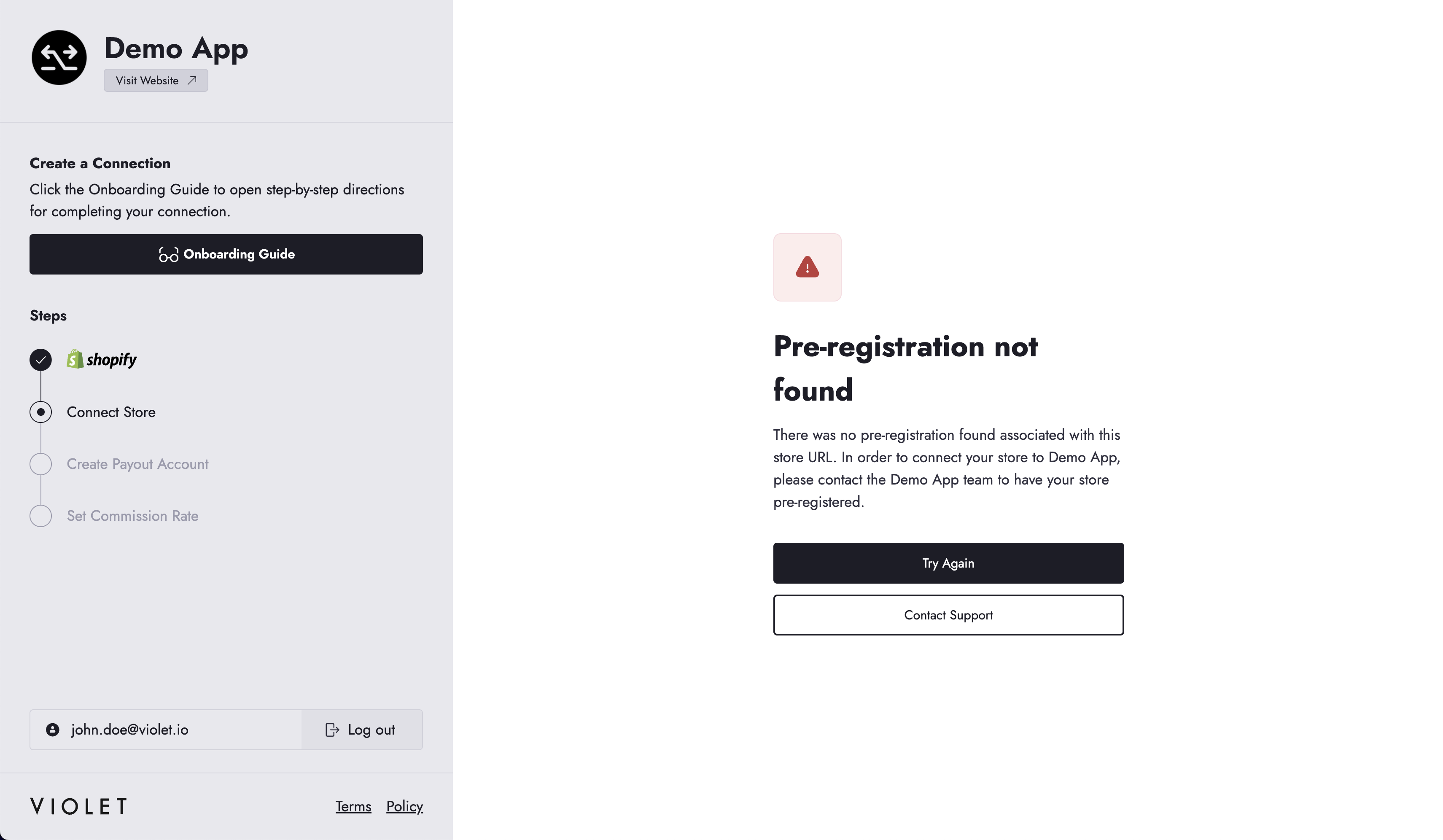
If the pre-registration wasn't created correctly and associated with the merchant's store, the merchant will see a "Pre-Registration not found" error. Make sure you enter the merchant's **permanent** `.myshopify.com` handle (not a vanity/renamed one) when setting up their pre-registration, and ensure your merchant enters the same store URL if they take this path.
 {% endhint %}
***
**Next step:** Learn about the [merchant onboarding experience](/ecom-platforms/shopify/merchant-onboarding.md) so you understand what happens after you send the link.
---
# Agent Instructions
This documentation is published with GitBook. GitBook is the documentation platform designed so that both humans and AI agents can read, navigate, and reason over technical content effectively. Learn more at gitbook.com.
## Querying This Documentation
If you need additional information that is not directly available in this page, you can query the documentation by asking a question.
Perform an HTTP GET request on the following URL with the `ask` and `goal` query parameters:
```
GET https://docs.violet.io/ecom-platforms/shopify/pre-registration.md?ask=&goal=
```
`ask` is the immediate question: it should be specific, self-contained, and written in natural language.
`goal` is what the user is ultimately trying to achieve, the reason they need the answer. Sharing it helps GitBook give you a better, more relevant answer. A goal is most helpful when it describes the outcome the user wants rather than restating the question. For example, with `ask=how do I create an API token`, a goal like `automate deployments from our CI pipeline` lets GitBook tailor the answer to that use case.
The response will contain a direct answer to the question and relevant excerpts and sources from the documentation.
Use this mechanism when the answer is not explicitly present in the current page, you need clarification or additional context, or you want to retrieve related documentation sections.
{% endhint %}
***
**Next step:** Learn about the [merchant onboarding experience](/ecom-platforms/shopify/merchant-onboarding.md) so you understand what happens after you send the link.
---
# Agent Instructions
This documentation is published with GitBook. GitBook is the documentation platform designed so that both humans and AI agents can read, navigate, and reason over technical content effectively. Learn more at gitbook.com.
## Querying This Documentation
If you need additional information that is not directly available in this page, you can query the documentation by asking a question.
Perform an HTTP GET request on the following URL with the `ask` and `goal` query parameters:
```
GET https://docs.violet.io/ecom-platforms/shopify/pre-registration.md?ask=&goal=
```
`ask` is the immediate question: it should be specific, self-contained, and written in natural language.
`goal` is what the user is ultimately trying to achieve, the reason they need the answer. Sharing it helps GitBook give you a better, more relevant answer. A goal is most helpful when it describes the outcome the user wants rather than restating the question. For example, with `ask=how do I create an API token`, a goal like `automate deployments from our CI pipeline` lets GitBook tailor the answer to that use case.
The response will contain a direct answer to the question and relevant excerpts and sources from the documentation.
Use this mechanism when the answer is not explicitly present in the current page, you need clarification or additional context, or you want to retrieve related documentation sections.